
Smart AI
Smart AI is a writing assistance feature integrated into the Back Office that helps support teams generate, rephrase and translate their responses in just a few clicks.
The main objective is to reduce the time spent writing while improving the clarity, consistency and linguistic quality of messages sent to end users.
Key capabilities of Smart AI:
Suggest a complete answer based on the question title.
Correct grammar and spelling.
Shorten or lengthen text as needed (e.g., summary vs. detailed answer).
Change tone (more formal, more friendly, etc.).
Simplify overly complex wording
Translate a response into another language
-
Support teams write a large volume of responses every day, often under time constraints, which generates:
A heavy cognitive load linked to writer's block and finding the right wording
Discrepancies in tone and quality between employees
Time wasted manually correcting, rephrasing or translating content
-
Based on feedback from internal teams and initial observations on the use of the Back Office, several irritants have emerged:
Agents often have to start from scratch for each new response, even for recurring questions.
Linguistic correction (mistakes, awkward phrasing, uneven language levels) requires additional proofreading.
The translation of responses (particularly for international customers) is carried out using external tools, which disrupts the workflow.
Some users report feeling uncomfortable with writing, which affects their confidence and speed.
These findings led to the design of a writing assistant system that is directly integrated into the response field, rather than a separate tool.

How might we …
Facilitate the drafting of a high-quality response without adding complexity to the Back Office interface?
UX process : user side
UX objective
Facilitate agents' work by integrating the writing assistant directly into their usual environment, without interrupting their workflow.
Key user experience
The agent writes or pastes their response into the Back Office editor.
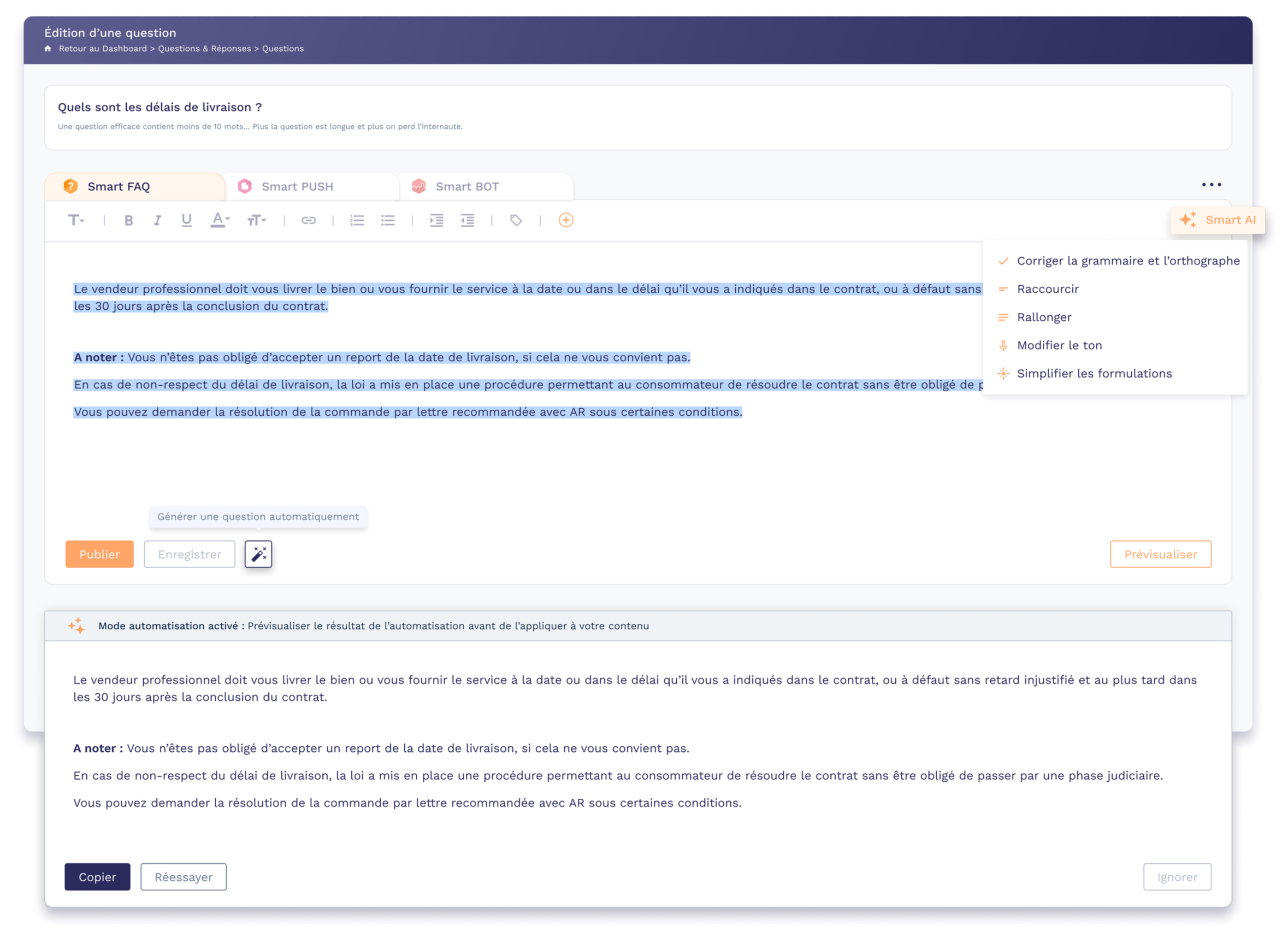
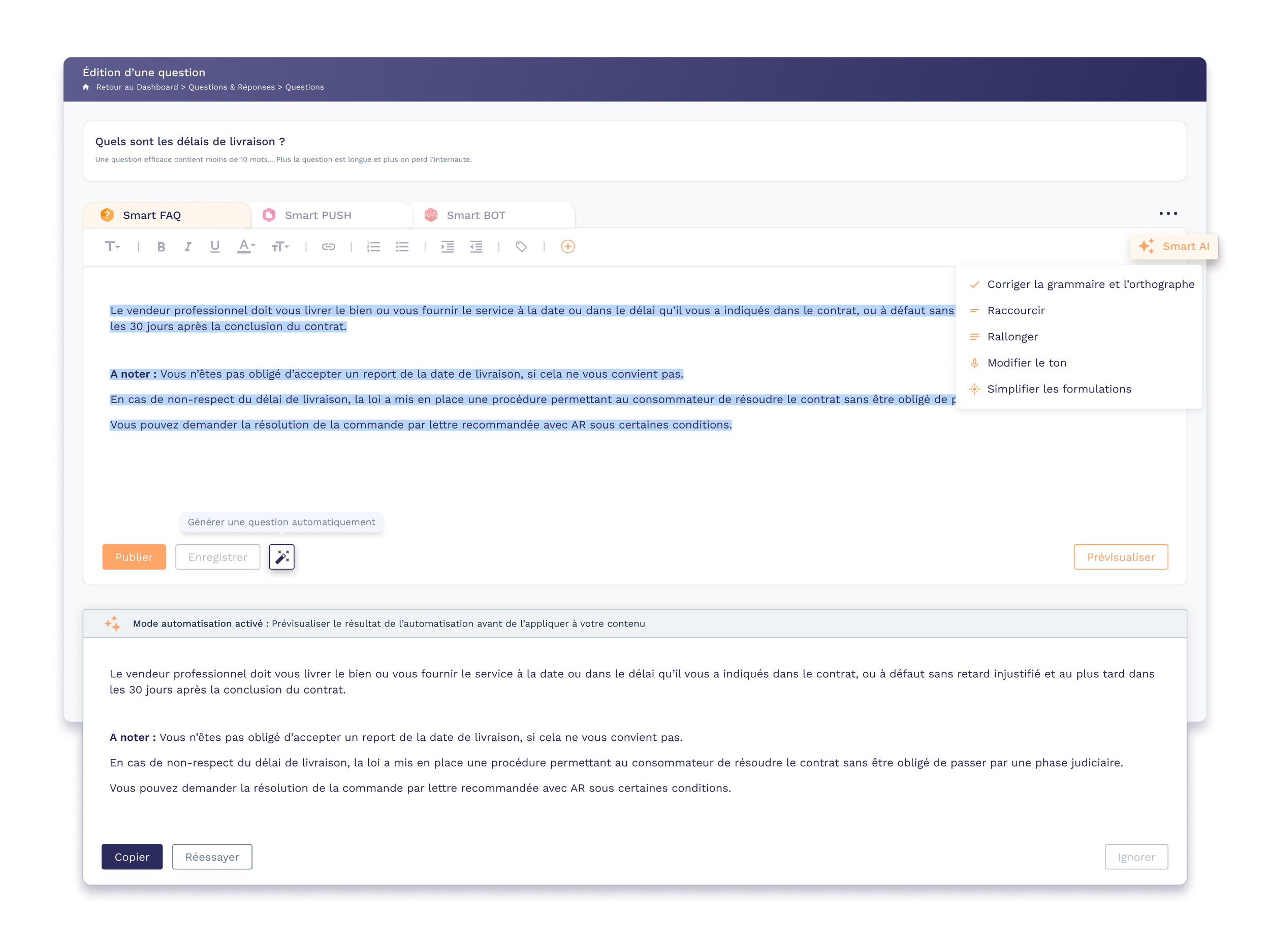
They select the text, then click on the ‘Smart AI’ button to: correct, shorten, lengthen, change the tone or simplify.
The generated text is previewed in a dedicated block at the bottom of the page, with the options ‘Copy’, ‘Try again’ or ‘Ignore’.
The user remains in control at all times: they compare, choose the final version and remain responsible for the content sent.
UI process – mock-ups & interface
Integration into the editor
Smart AI button added to the editor toolbar, with a specific icon.
Drop-down menu clearly displaying the different actions (correct, shorten, lengthen, change tone, simplify).
Style aligned with the existing design system to maintain a consistent interface.
Preview of the result
Preview block at the bottom of the screen, visually separated from the original content.
Understated typography and clear hierarchy to make the transformed text easier to read.
Primary action buttons (Copy) and clearly identified secondary buttons (Retry/Ignore) to encourage exploration while reassuring users that they can go back.
User test
Objective: Understanding how and why users utilised this new AI-based feature to obtain a suggested response generated simply from the question title.
Problem: How can we make writing responses easier and faster?
Test environment:
Within the Back Office, a sample group of beta testers can test the ‘response suggestion’ feature.
After three weeks of testing, send a questionnaire to all customers registered as beta testers.
Results & Impact
After three weeks of beta testing and sending out the questionnaire:
The majority of beta testers used the suggested response based on the title at least once.
Qualitative feedback shows that Smart AI is particularly appreciated for:
Saving time on initial response drafts
Quickly correcting grammar and phrasing
Translating responses without leaving the back office
Users report feeling more comfortable answering complex questions or questions in a language that is not their native language, which enhances consistency and the perceived quality of support.
Identified areas for improvement:
✔️ Refine suggestions based on context (type of question, response history)
✔️ Offer tone presets (e.g., ‘very formal,’ ‘educational,’ ‘concise’) tailored to the brand
✔️ Track more precise metrics (average writing time, suggestion reuse rate, end-user satisfaction).
Keep reading
More examples of design that drives results.